reading-notes
Authentication
Reading
Questions
What is O-Auth
- What is OAuth?
- Secure, third-party, user-agent, delegated authorization
- Allows authenticated access to sites without these sites actually sharing the initial single logon credential
- Give an example of what using OAuth would look like.
- When I go to a site and it gives me the option to sign-up/in with Google, Facebook, Twitter, GitHub, etc.
- How does OAuth work? What are the steps that it takes to authenticate the user?
- The first website connects to the second website on behalf of the user, using OAuth, providing the user’s verified identity.
- The second site generates a one-time token and a one-time secret unique to the transaction and parties involved.
- The first site gives this token and secret to the initiating user’s client software.
- The client’s software presents the request token and secret to their authorization provider (which may or may not be the second site).
- If not already authenticated to the authorization provider, the client may be asked to authenticate. After authentication, the client is asked to approve the authorization transaction to the second website.
- The user approves (or their software silently approves) a particular transaction type at the first website.
- The user is given an approved access token (notice it’s no longer a request token).
- The user gives the approved access token to the first website.
- The first website gives the access token to the second website as proof of authentication on behalf of the user.
- The second website lets the first website access their site on behalf of the user.
- The user sees a successfully completed transaction occurring.
- What is OpenID?
- A single-sign on Authentication application
- Rather than Authorizing a site to connect on behalf of a user (a machine-to-machine connection), OpenID allows a person to authenticate themselves on a site using a single sign on credential (a human-to-machine connection)
Authorization and Authentication Flows
- What is the difference between authorization and authentication?
- Authentication determines whether users are who claim to be
- Authorization determines what users can and cannot access
- What is Authorization Code Flow?
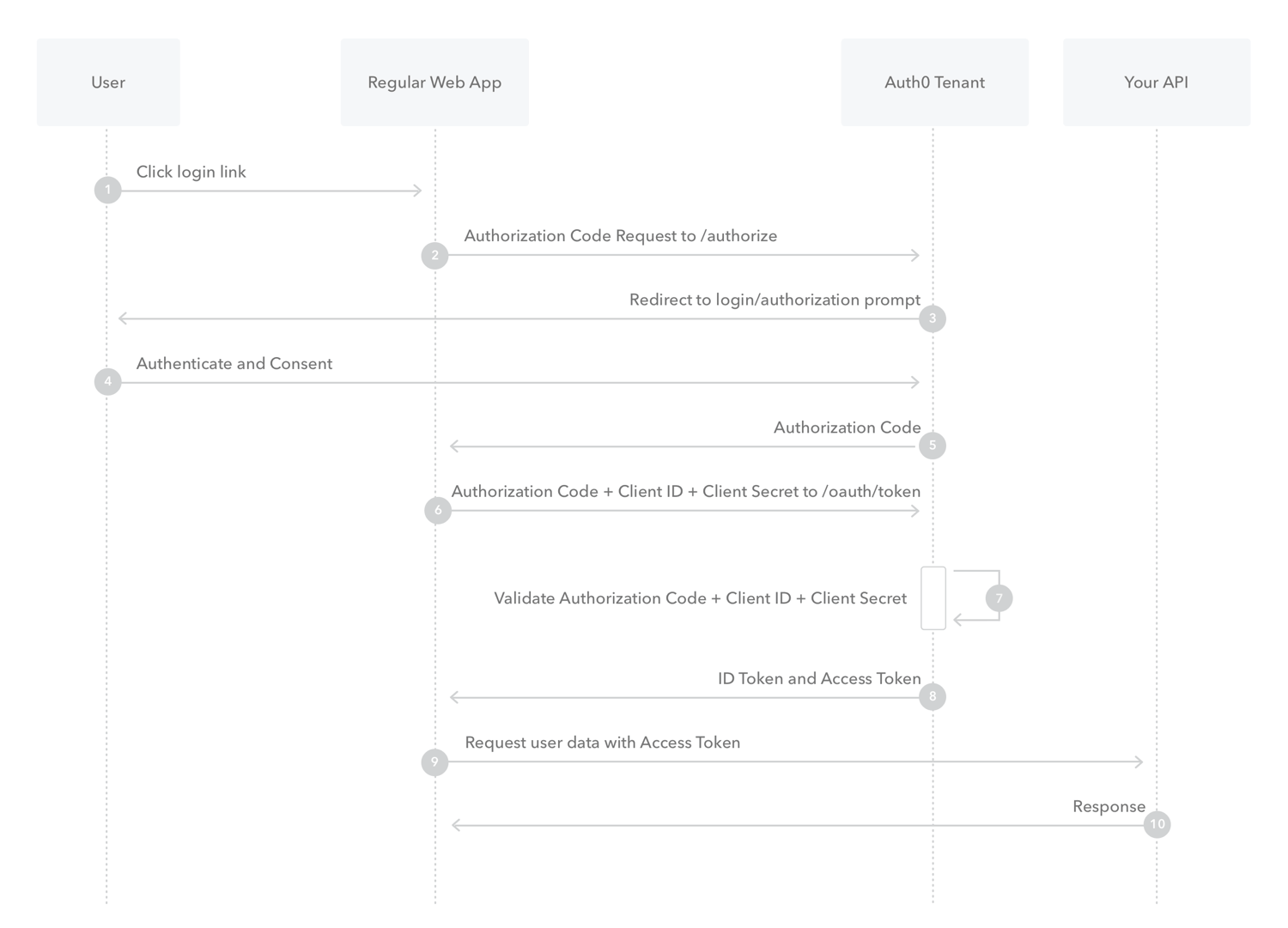
- The user clicks Login within the regular web application.
- Auth0’s SDK redirects the user to the Auth0 Authorization Server (
/authorizeendpoint). - Your Auth0 Authorization Server redirects the user to the login and authorization prompt.
- The user authenticates using one of the configured login options and may see a consent page listing the permissions Auth0 will give to the regular web application.
- Your Auth0 Authorization Server redirects the user back to the application with an authorization code, which is good for one use.
- Auth0’s SDK sends this code to the Auth0 Authorization Server (
/oauth/tokenendpoint) along with the application’s Client ID and Client Secret. - Your Auth0 Authorization Server verifies the code, Client ID, and Client Secret.
- Your Auth0 Authorization Server responds with an ID Token and Access Token (and optionally, a Refresh Token).
- Your application can use the Access Token to call an API to access information about the user.
- The API responds with requested data.
- What is Authorization Code Flow with Proof Key for Code Exchange (PKCE)?
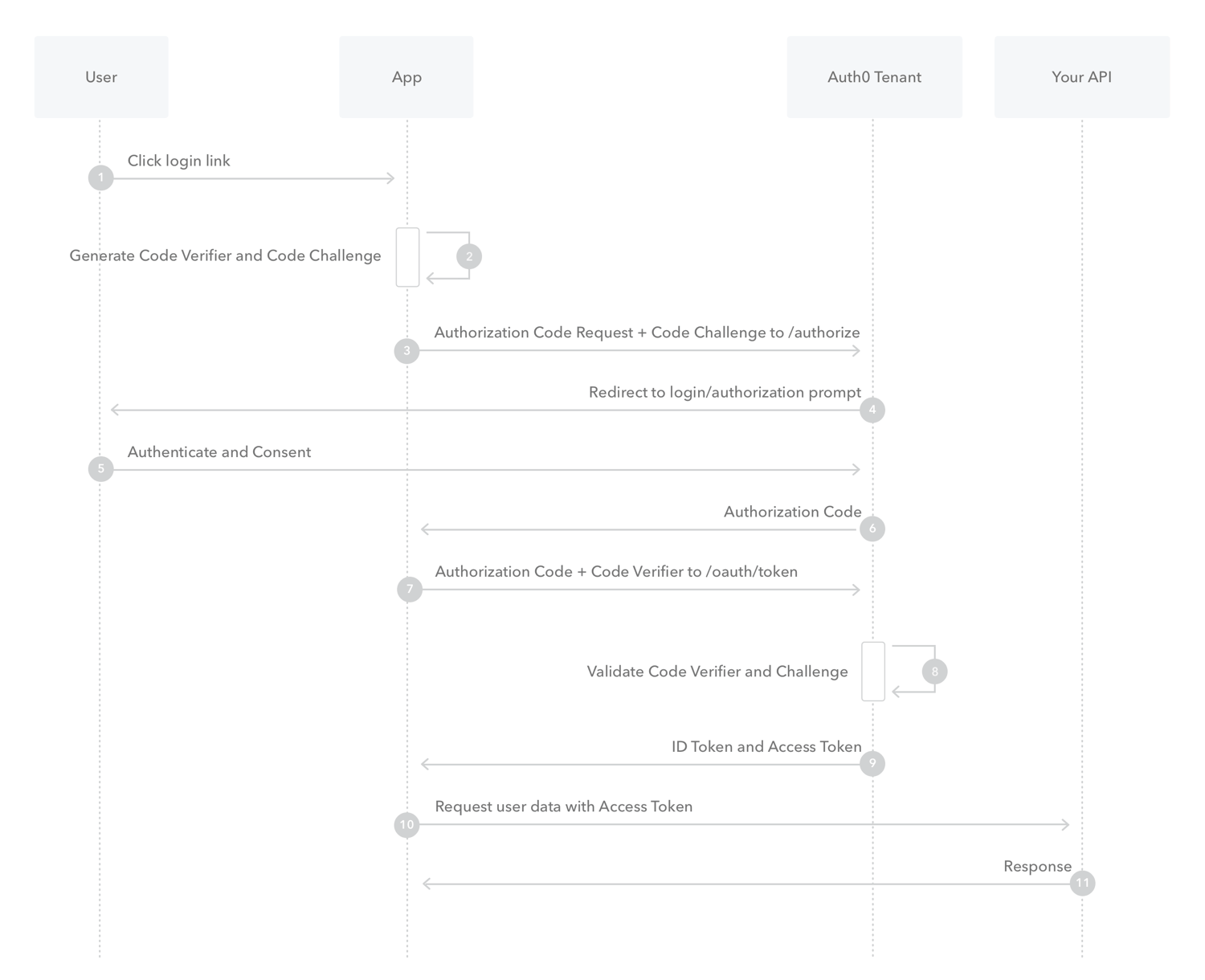
- The user clicks Login within the application.
- Auth0’s SDK creates a cryptographically-random
code_verifierand from this generates acode_challenge. - Auth0’s SDK redirects the user to the Auth0 Authorization Server (
/authorizeendpoint) along with thecode_challenge. - Your Auth0 Authorization Server redirects the user to the login and authorization prompt.
- The user authenticates using one of the configured login options and may see a consent page listing the permissions Auth0 will give to the application.
- Your Auth0 Authorization Server stores the code_challenge and redirects the user back to the application with an authorization code, which is good for one use.
- Auth0’s SDK sends this code and the code_verifier (created in step 2) to the Auth0 Authorization Server (
/oauth/tokenendpoint). - Your Auth0 Authorization Server verifies the
code_challengeandcode_verifier. - Your Auth0 Authorization Server responds with an ID token and access token (and optionally, a refresh token).
- Your application can use the access token to call an API to access information about the user.
- The API responds with requested data.
- What is Implicit Flow with Form Post?

- The user clicks Login in the app.
- Auth0’s SDK redirects the user to the Auth0 Authorization Server (
/authorizeendpoint) passing along aresponse_typeparameter ofid_tokenthat indicates the type of requested credential. It also passes along aresponse_modeparameter ofform_postto ensure security. - Your Auth0 Authorization Server redirects the user to the login and authorization prompt.
- The user authenticates using one of the configured login options and may see a consent page listing the permissions Auth0 will give to the app.
- Your Auth0 Authorization Server redirects the user back to the app with an ID Token.
- What is Client Credentials Flow?
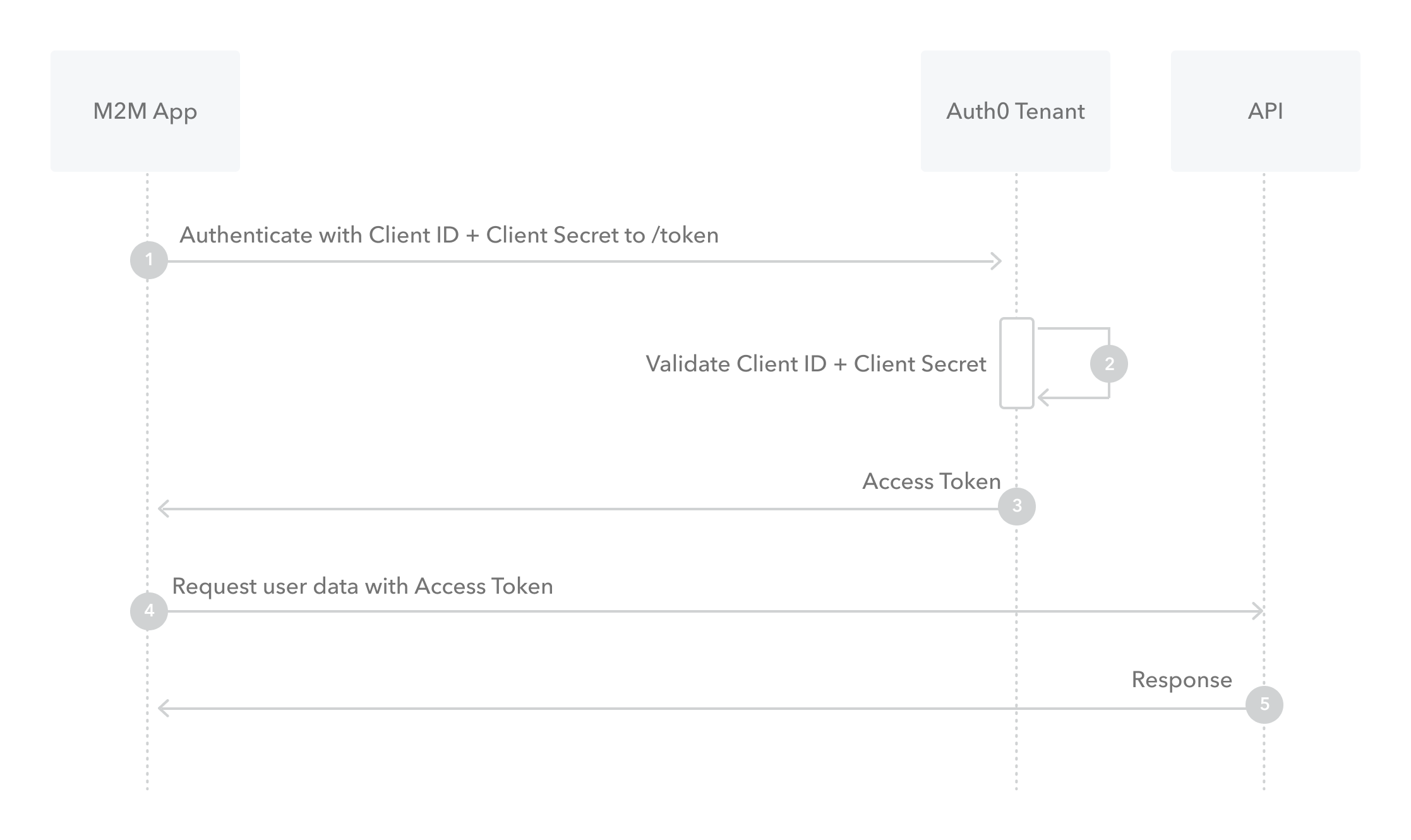
- The application authenticates with the Auth0 Authorization Serverusing its Client ID and Client Secret (
/oauth/tokenendpoint). - Auth0 Authorization Server validates the Client ID and Client Secret.
- Auth0 Authorization Server responds with an Access Token.
- The application can use the access token to call an API on behalf of itself.
- The API responds with requested data.
- The application authenticates with the Auth0 Authorization Serverusing its Client ID and Client Secret (
- What is Device Authorization Flow?
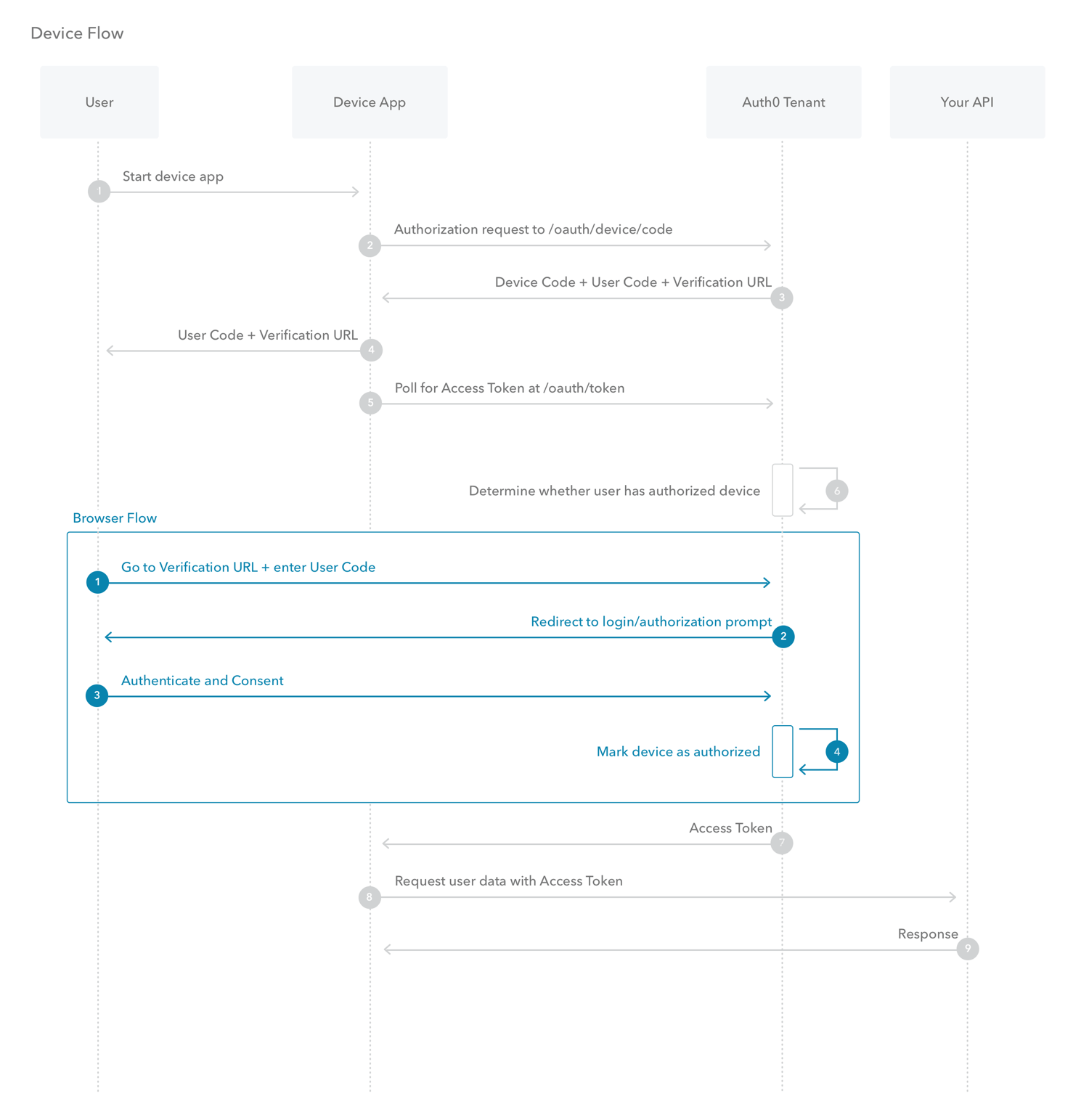
- The user starts the app on the device.
- The device app requests authorization from the Auth0 Authorization Server using its Client ID (1/oauth/device/code` endpoint).
- The Auth0 Authorization Server responds with a
device_code,user_code,verification_uri,verification_uri_completeexpires_in(lifetime in seconds fordevice_codeanduser_code), and polling interval. - The device app asks the user to activate using their computer or smartphone. The app may accomplish this by:
- Asking the user to visit the
verification_uriand enter theuser_codeafter displaying these values on-screen - Asking the user to interact with either a QR Code or shortened URL with embedded user code generated from the
verification_uri_complete - Directly navigating to the verification page with embedded user code using
verification_uri_complete, if running natively on a browser-based device
- Asking the user to visit the
- The device app begins polling your Auth0 Authorization Server for an Access Token (
/oauth/tokenendpoint) using the time period specified by interval and counting from receipt of the last polling request’s response. The device app continues polling until either the user completes the browser flow path or the user code expires. - When the user successfully completes the browser flow path, your Auth0 Authorization Server responds with an Access Token (and optionally, a Refresh Token). The device app should now forget its device_code because it will expire.
- Your device app can use the Access Token to call an API to access information about the user.
- The API responds with requested data.
- What is Resource Owner Password Flow?
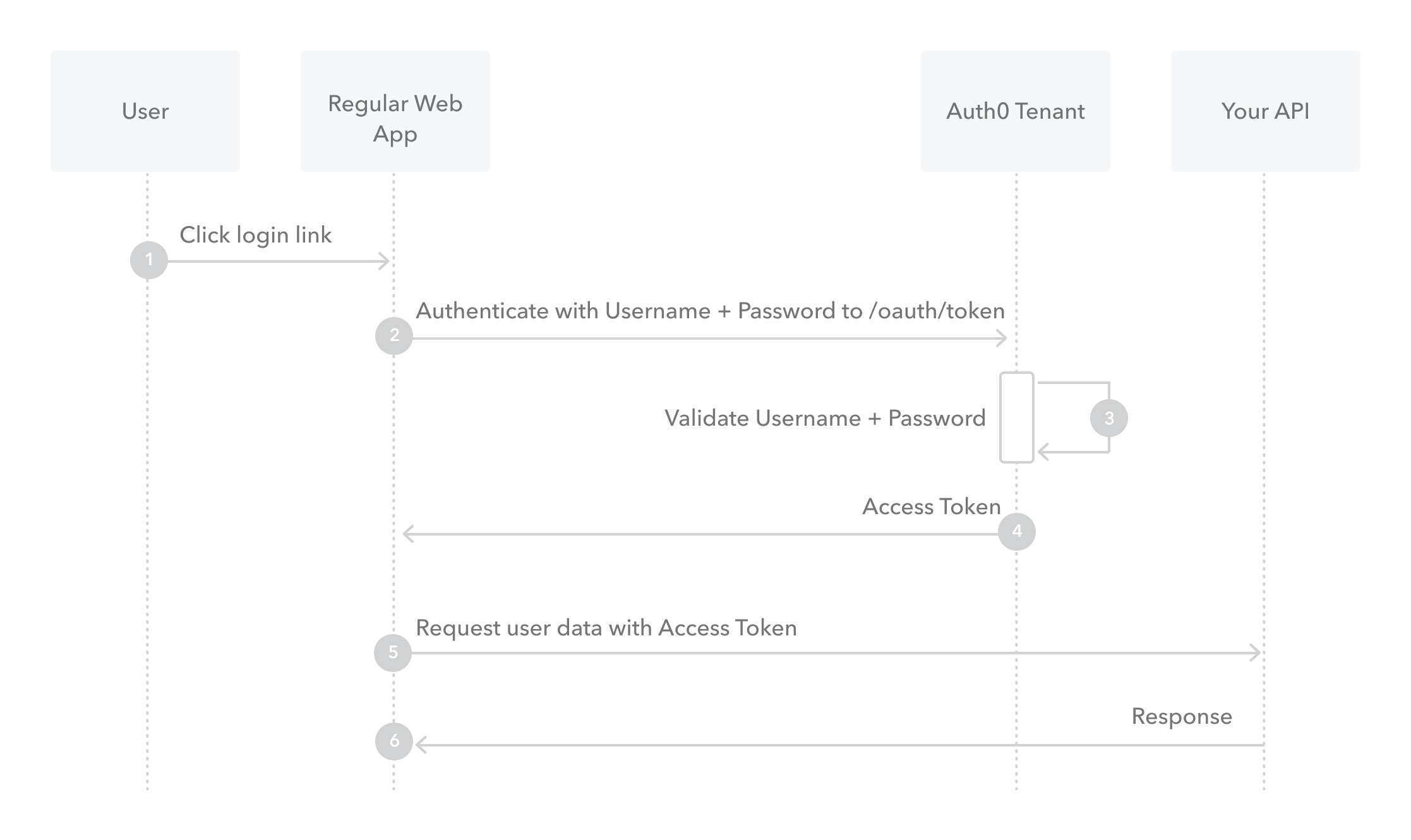
- The user clicks Login within the application and enters their credentials.
- Your application forwards the user’s credentials to your Auth0 Authorization Server (
/oauth/tokenendpoint). - Your Auth0 Authorization Server validates the credentials.
- Your Auth0 Authorization Server responds with an Access Token (and optionally, a Refresh Token).
- Your application can use the Access Token to call an API to access information about the user.
- The API responds with requested data.
Notes
- TODO
In Class Notes
Lab: OAuth
- Got to Auth0 website and create account
- Will work in
ApplicationandDocumentation - In
Applications, name applicationCan of Booksand create aSingle Page Web App - Go to
Settingsto get your domain, client secret key, client ID, etc. - Need to install
Auth0in React front end- Follow documentation on required dependencies and libraries to install
- Create a
.envfile to create:REACT_APP_SERVER_URL=REACT_APP_DOMAIN=REACT_APP_CLIENT_ID=REACT_APP_REDIRECT_URI=
- Create functional component files:
LoginButton.jsLogoutButton.jsProfile.js- Copy the code provided by Auth0 into these files
- Import
Buttonfrom React into theLoginButtonandLogoutButtonfiles and update the<button>tags to be Bootstrap components<Button>
- Inside
App.js, import Auth0:import { withAuth0 } from '@auth0/auth-0-react'- NOTE:
withAuth0is for use on App level;useAuth0is for functional components - When exporting from
App.js:export default withAuth0(App);
-
Add ternary to
App.jsto show a login vs. logout button:{this.props.auth0.isAuthenticated ? <LogoutButton/> : <LoginButton/>}
- Create a
Content.jsfile to add in the content that the user can expect to see if they successfully login - Get the token from Auth0:
const res = await this.props.auth0.getIdTokenClaims();const jwt = res.__raw;- Send
configobject to make our call to the API using the tokenjwt:- i.e.
let results = await axios(config) - NOTE:
jwt= JSON web token (‘J Watt’) - NOTE:
jwks= JSON Web Key Set (‘Ja-Wicks)jwkskey can be brought over from the Auth0Advanced Settingssection of theApplication=>Settingspage
let config = { method: 'get', baseURL: 'process.env.REACT_APP_SERVER_URL', url: '/books', header: { "Authorization": `Bearer ${jwt}` } } - i.e.