reading-notes
JavaScript Canvas
Reading
Notes
Canvas Overview
<canvas>allows the user to draw 2D graphics using JS- Requires at least 2 attributes
widthandheight
- Requires at least 2 attributes
<canvas>requires a closing tag- Anything between the tags is fallback content
getContext()
getContext()allows you select the type of drawing to make- I.E.
2dfor 2D images
- I.E.
- You will need to verify the browser can support the
getContextmethod- To do so, run the following:
let canvas = document.querySelector('#main'); if(canvas.getContext) { let ctx = main.getContext('2d'); } getContext()returns a render context object- It takes a single argument, the type of context
- EX:
2d
- EX:
- By invoking the
getContext(2d)method, you can draw shapes, text, images, and other objects
2D Context
- 2D drawing allows you to draw simple shapes using a grid coordinate system
- The grid begins at the upper-left
<canvas>element (0,0)
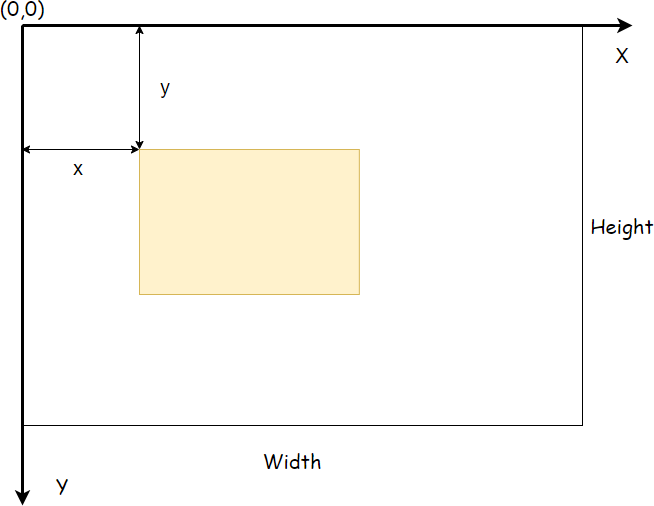
- All coordinate values are calculated in relation to the
(0,0)withxincreasing to the right andyincreasing to the bottom
Fills & Strokes
fillStyle&strokeStyledetermine fill and stroke (line) styles- These can be a string, gradient object, or a pattern object
- By default, they have a value of
#000000
- By default, they have a value of
- Example: 2D Rectangle
(() => {
    const canvas = document.querySelector('#main');
    if (!canvas.getContext) {
        return;
    }

    // get the context
    let ctx = canvas.getContext('2d');

    // set fill and stroke styles
    ctx.fillStyle = '#F0DB4F';
    ctx.strokeStyle = 'red';

    // draw a rectangle with fill and stroke
    ctx.fillRect(50, 50, 150, 100);
    ctx.strokeRect(50, 50, 150, 100);
})();